> ## Documentation Index
> Fetch the complete documentation index at: https://docs.intelagent.ca/llms.txt
> Use this file to discover all available pages before exploring further.
# Bill the Anaesthesia Stipend
> Submit H010A — one claim per service date with the day's total eligible hours — either one day at a time or a whole schedule at once
The anaesthesia stipend ([OHIP INFOBulletin 260802](https://www.ontario.ca/document/ohip-infobulletins-2026/bulletin-260802-physician-services-agreement-update-anaesthesia))
is billed with **H010A**, one claim per physician per service date, under the
four-character group number the ministry issued to your hospital's anaesthesia
service.
**No dummy patient. No diagnosis. No facility.** OHIP wants the health number,
version code and date of birth blank on this claim, and IntelAGENT sends it
exactly that way — so there is no placeholder card to invent, and no workaround
to remember. Both screens below simply leave those fields empty.
The quantity is the number of eligible hours you worked that day, and the amount
comes from [Appendix A's sliding scale](https://www.ontario.ca/document/ohip-infobulletins-2026/bulletin-260802-physician-services-agreement-update-anaesthesia#section-6)
rather than a fee per unit. IntelAGENT prices every day as you enter it, so you
see what the schedule is worth before any of it is submitted.
There are two ways to bill it, and they produce identical claims:
| | Use it when |
| ----------------------- | --------------------------------------------------------- |
| **New Claim** | One day, right now — you're already on the claim screen. |
| **Anaesthesia Stipend** | Several days, a call schedule, or a spreadsheet of hours. |
## Bill one day from New Claim
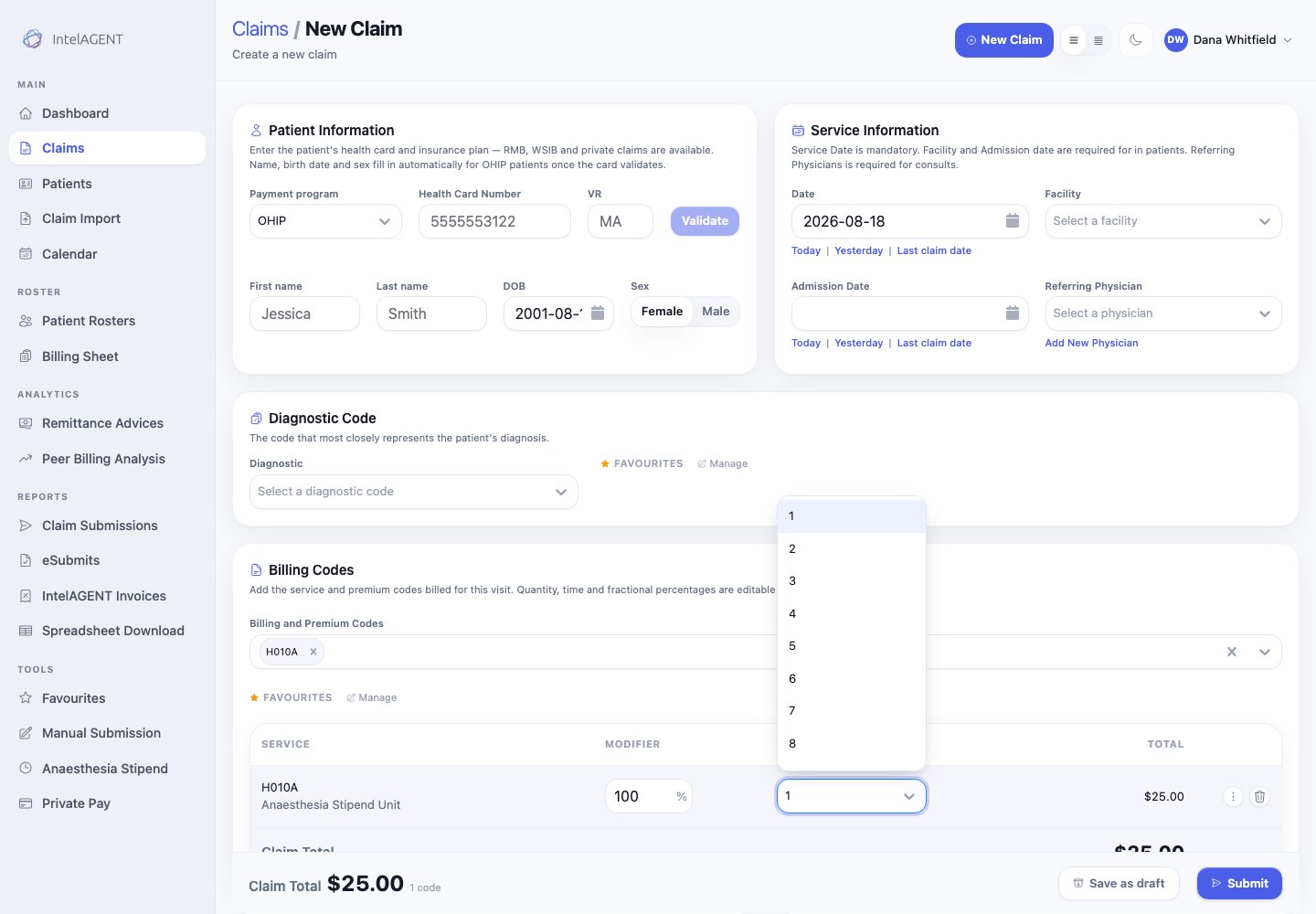
Open **New Claim** and add **H010A** in **Billing Codes**. The patient panel,
diagnosis and facility stay empty — that is correct for this code, and
IntelAGENT stops asking for them as soon as H010A is on the claim.
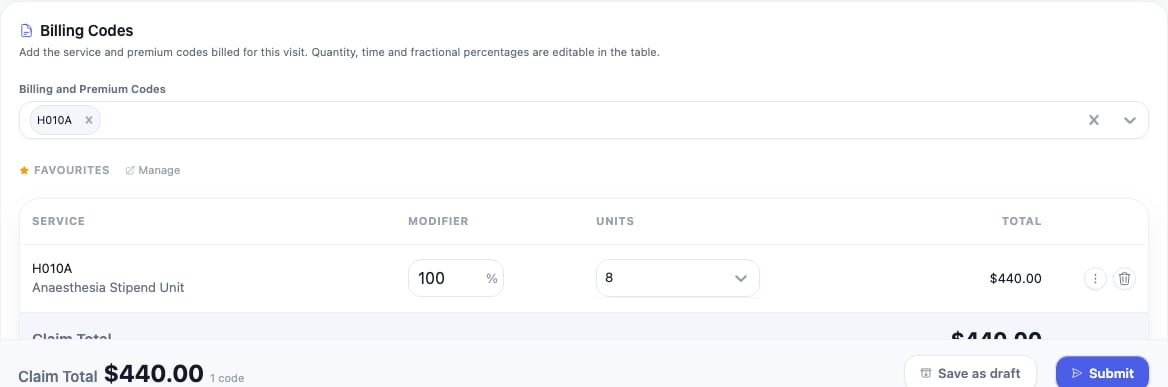
Set **Units** to the hours you worked that day. The claim total updates to the
Appendix A amount for that tier, so you can see what the day is worth before you
send it.
 In **Options**, set **MOH** to your stipend group. The MOH field appears here
whether or not you normally show it, because H010A cannot be billed without it.
In **Options**, set **MOH** to your stipend group. The MOH field appears here
whether or not you normally show it, because H010A cannot be billed without it.
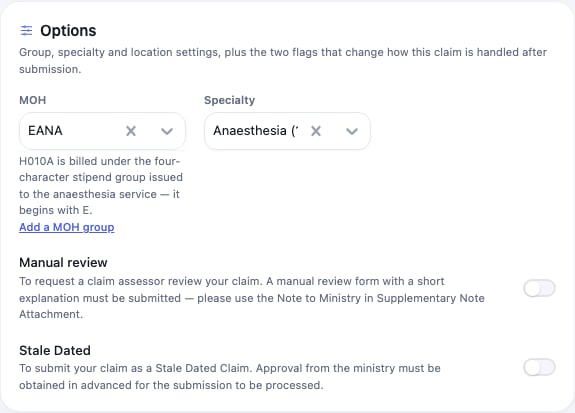 If the group isn't in the list yet, **Add a MOH group** adds it without losing
the claim you're writing.
Then **Submit**, exactly as you would any other claim.
## Bill several days from the stipend sheet
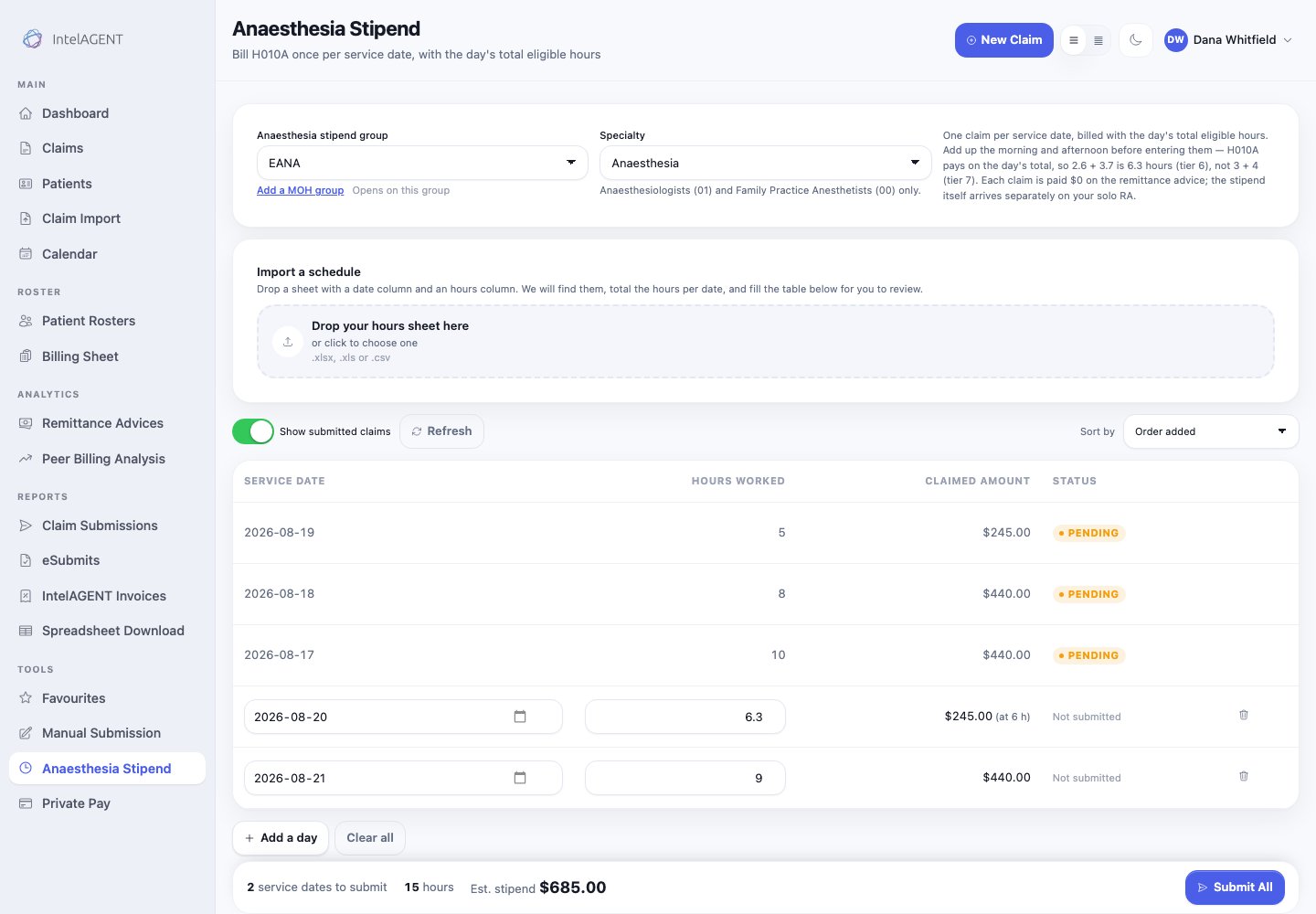
**Anaesthesia Stipend** in the sidebar is a sheet of dates and hours, and
nothing else — because that is all this code needs.
If the group isn't in the list yet, **Add a MOH group** adds it without losing
the claim you're writing.
Then **Submit**, exactly as you would any other claim.
## Bill several days from the stipend sheet
**Anaesthesia Stipend** in the sidebar is a sheet of dates and hours, and
nothing else — because that is all this code needs.
 ### 1. Check the group and specialty
The top row is the setup for everything below it. Pick the stipend group and the
specialty you bill under.
### 1. Check the group and specialty
The top row is the setup for everything below it. Pick the stipend group and the
specialty you bill under.
 **Save as default** makes that group the one this sheet opens on next time. It
is also added to your MOH groups, so it appears everywhere else you bill.
### 2. Enter the days
Type a date and the hours worked, then **Add a day** for the next one. Hours take
decimals — enter what you actually worked.
Add up the morning and the afternoon **before** you enter them. H010A pays on
the day's total, so 2.6 + 3.7 is 6.3 hours (tier 6), not 3 + 4 (tier 7).
Entering the same date twice is both a duplicate claim and the wrong tier;
the sheet offers **Combine duplicate dates** when it sees one.
The claimed amount for each row updates as you type, and the bar at the bottom
totals what you are about to submit.
### 3. Or import a schedule
If your hours already exist in a spreadsheet — a call schedule, a payroll export
— drop it on the import panel. IntelAGENT finds the date column and the hours
column, adds up multiple entries for the same date, and fills the table for you
to review.
**Save as default** makes that group the one this sheet opens on next time. It
is also added to your MOH groups, so it appears everywhere else you bill.
### 2. Enter the days
Type a date and the hours worked, then **Add a day** for the next one. Hours take
decimals — enter what you actually worked.
Add up the morning and the afternoon **before** you enter them. H010A pays on
the day's total, so 2.6 + 3.7 is 6.3 hours (tier 6), not 3 + 4 (tier 7).
Entering the same date twice is both a duplicate claim and the wrong tier;
the sheet offers **Combine duplicate dates** when it sees one.
The claimed amount for each row updates as you type, and the bar at the bottom
totals what you are about to submit.
### 3. Or import a schedule
If your hours already exist in a spreadsheet — a call schedule, a payroll export
— drop it on the import panel. IntelAGENT finds the date column and the hours
column, adds up multiple entries for the same date, and fills the table for you
to review.
 Columns it can't identify are offered as two dropdowns so you can point at them
yourself, and **Re-read sheet** applies your choice.
### 4. Submit
**Submit All** sends every day on the sheet as its own claim. Days that go
through leave the sheet and join the list of claims above it; anything the
ministry refuses stays, with the reason on the row.
## What the sheet checks for you
**Show submitted claims** — on by default — lists the H010A claims you have
already made. A date on the sheet that already carries a claim is flagged, and
**Submit All skips it**, because OHIP takes one stipend claim per service date.
Columns it can't identify are offered as two dropdowns so you can point at them
yourself, and **Re-read sheet** applies your choice.
### 4. Submit
**Submit All** sends every day on the sheet as its own claim. Days that go
through leave the sheet and join the list of claims above it; anything the
ministry refuses stays, with the reason on the row.
## What the sheet checks for you
**Show submitted claims** — on by default — lists the H010A claims you have
already made. A date on the sheet that already carries a claim is flagged, and
**Submit All skips it**, because OHIP takes one stipend claim per service date.
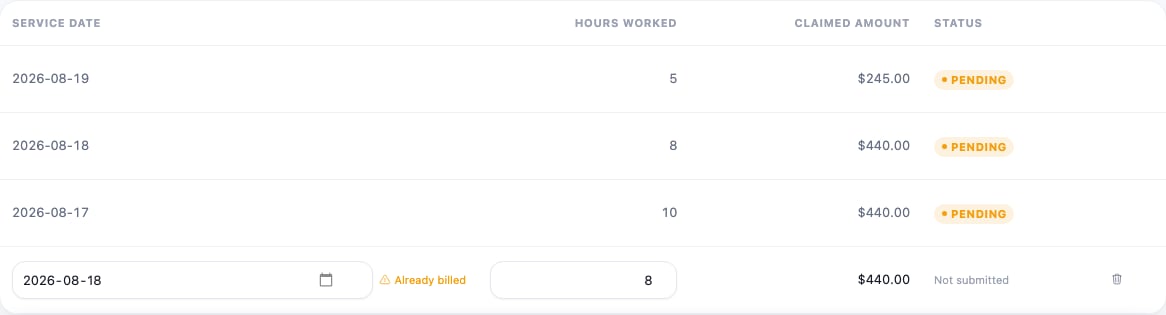 The sheet also flags:
* **Weekend** — the stipend covers scheduled weekday hours, Mon–Fri 07:00–17:00.
* **Duplicate date** — two rows for one day, with a button to combine them.
* **A day over 24 hours** — a data-entry slip rather than a day.
## What you get paid
The amount shown is [Appendix A's](https://www.ontario.ca/document/ohip-infobulletins-2026/bulletin-260802-physician-services-agreement-update-anaesthesia#section-6)
sliding scale, read off the day's rounded hours:
| Hours worked | Stipend |
| ------------ | ------- |
| 1–3 | \$25 |
| 4 | \$220 |
| 5–7 | \$245 |
| 8–10 | \$440 |
Rounding happens once, on the day's total — 6.3 hours is tier 6.
Each H010A claim is paid **\$0 on your remittance advice**. That is expected:
the stipend itself arrives separately on your solo RA. The amounts on this
screen are for your own reconciliation, and the ministry decides eligibility
when it processes the stipend, so an accepted claim is not a payment decision.
## Common problems
The reason is printed beside the button — no group selected, a group that
doesn't begin with `E`, no specialty, duplicate dates, or every date on the
sheet already billed.
A stipend group is exactly four characters starting with `E`, issued to the
hospital anaesthesia service. It is **not** your usual anaesthesia group
number, and using an ordinary group here means OHIP will not pay the claim.
H010A may only be billed under Anaesthesia (01) or Family Practice
Anesthetist (00). If you hold both, bill it under 01.
Change it before submitting. OHIP warns that billing other services under a
stipend group can affect their payment — this is the more expensive mistake
of the two, and IntelAGENT blocks it at submission.
The sheet also flags:
* **Weekend** — the stipend covers scheduled weekday hours, Mon–Fri 07:00–17:00.
* **Duplicate date** — two rows for one day, with a button to combine them.
* **A day over 24 hours** — a data-entry slip rather than a day.
## What you get paid
The amount shown is [Appendix A's](https://www.ontario.ca/document/ohip-infobulletins-2026/bulletin-260802-physician-services-agreement-update-anaesthesia#section-6)
sliding scale, read off the day's rounded hours:
| Hours worked | Stipend |
| ------------ | ------- |
| 1–3 | \$25 |
| 4 | \$220 |
| 5–7 | \$245 |
| 8–10 | \$440 |
Rounding happens once, on the day's total — 6.3 hours is tier 6.
Each H010A claim is paid **\$0 on your remittance advice**. That is expected:
the stipend itself arrives separately on your solo RA. The amounts on this
screen are for your own reconciliation, and the ministry decides eligibility
when it processes the stipend, so an accepted claim is not a payment decision.
## Common problems
The reason is printed beside the button — no group selected, a group that
doesn't begin with `E`, no specialty, duplicate dates, or every date on the
sheet already billed.
A stipend group is exactly four characters starting with `E`, issued to the
hospital anaesthesia service. It is **not** your usual anaesthesia group
number, and using an ordinary group here means OHIP will not pay the claim.
H010A may only be billed under Anaesthesia (01) or Family Practice
Anesthetist (00). If you hold both, bill it under 01.
Change it before submitting. OHIP warns that billing other services under a
stipend group can affect their payment — this is the more expensive mistake
of the two, and IntelAGENT blocks it at submission.